ColpoITPro Redefining Colposcopy Procedure Documentation
Simple Elegant Design
Easy to Use
Simple Elegant Design
Easy to Use
WHO Standard Follow
Feature Rich
WHO Standard Follow
Feature Rich
Trusted By Thousands
Value for Money
Trusted By Thousands
Value for Money
ColpoITPro Colposcopy Imaging Software : Protecting women’s health
ColpoITPro is an independent and totally self-contained video capture software product that works with various Colposcope brands giving video signal as Composite Video or S-Video output or BNC or DVI or HDMI or HDSDI. Video output is captured via a video capture card installed in the system running ColpoITPro software and the images/videos are stored/retrieved/managed by the software.
ColpoITPro helps in documenting critical Colposcopy procedures according to WHO standard including Biopsy marking, Reid Index score, Swede score, library image comparison etc… ColpoITPro supports useful features like Acetic Acid/Iodine solution test timer function, DICOM image conversion, DICOM send/receive from PACS, HIS/HMS integration using HL7 protocol and much, much more.
ColpoITPro is the answer to your search for simple fast, reliable and efficient video capture and image management software for Colposcopy Examination.
Colposcopy Imaging
ColpoITPro, an innovative solution from AmbalSoft, empowers medical professionals to transition from handwritten reports to a fully digital colposcopy imaging and video management system. It incorporates the latest modified Reid Index and Swede Score values as per WHO standards, and includes built-in referral library images along with biopsy marking tools, enabling accurate, efficient, and standardized documentation of colposcopy examinations.
High Definition Capture
ColpoITPro software connects seamlessly with HD colposcopes and imaging systems (DVI/HDMI/HD-SDI output), enabling the recording of high-definition videos and images in 720p or 1080p at 50/60fps. Utilizing advanced H.264 video compression, it ensures excellent playback quality. Captured HD images and videos can be edited and annotated for presentations, training, and reporting purposes.
The software also supports a wide range of USB camera devices commonly used with mobile colposcopy units. Its API customization module allows integration with USB colposcopy systems such as Point Grey, Sony, NET Camera, and others, providing flexibility and compatibility across diverse equipment.
DICOM Support
ColpoITPro enables secure storage of colposcopy images and videos in DICOM format, ensuring compliance with medical imaging standards. It allows generation of DICOM reports and seamless transmission to a PACS server for centralized access and long-term archival.
Customizable report templates
ColpoITPro software offers predefined templates for colposcopy procedures, allowing users to select findings from built-in libraries instead of typing manually. Users can also customize templates in their regional languages, while the Microsoft Word interface reporting provides additional flexibility for creating fully personalized reports.
Modified Reid Index
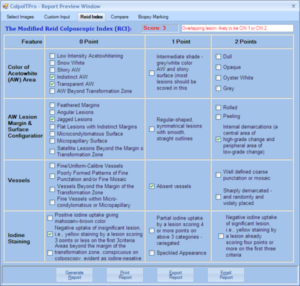
ColpoITPro software includes the latest modified Reid Index to help doctors track findings and generate the Reid score for assessing infection severity. Reid’s Colposcopy Index (RCI) is a systematic, objective method to grade the severity of pre-malignant cervical lesions. The final report automatically displays the selected Reid Index objectives along with their respective score descriptions.
Swede Score
The Swede Score is an advanced scoring system in colposcopy, similar to the Reid Index (RCI) with score values 0, 1, 2, but additionally incorporates lesion size as a key variable. It is easy to use, with no steep learning curve, making it accessible for any colposcopist. The selected Swede Score options are automatically included in the final report for accurate documentation and future reference.
Image Comparison
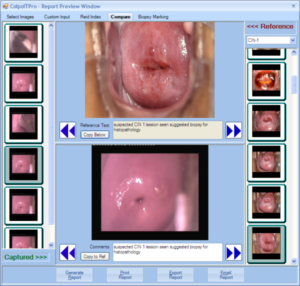
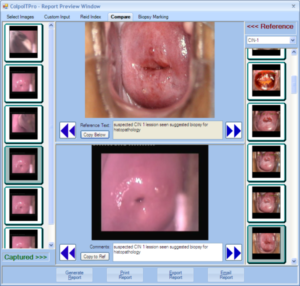
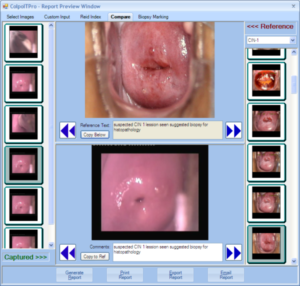
ColpoITPro includes a library of over 300 standard images with detailed descriptions, which can be compared with actual study data. The images are categorized into CIN 1, CIN 2, and CIN 3 stages. Users can also add selected images to the library for future reference according to their needs.
Biopsy Marking
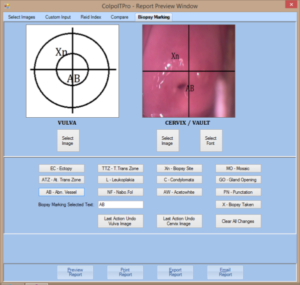
ColpoITPro software includes an in-built graphical abstract module to visually mark colposcopy findings. Users can select a colposcopy study image from the database and perform biopsy marking for enhanced understanding during training sessions. The final report automatically includes the marked graphical image alongside the report findings.
HL7 Complaint
ColpoITPro software seamlessly integrates with Hospital Management Systems (HMS) and adheres to international standards such as HL7 and DICOM MWL. It supports a wide range of HL7 protocol versions and provides bi-directional communication to retrieve patient data from HMS/RIS and transmit captured data back to the server for centralized storage. The software can efficiently handle ORM and ADT messages for activities including new orders, order cancellations, and order updates.
Client-Server Architecture
ColpoITPro software connects multiple procedure client systems to a centralized database, providing scalable access as the number of clients increases. It can be used standalone or synchronized with a centralized server. With a dedicated viewer license, users can set up registration or reporting stations, allowing patient registration and reporting tasks to operate independently from the capturing client.
Image / Video Editing
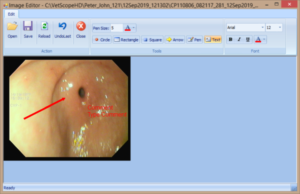
ColpoITPro software includes an in-built image editor with annotation tools to highlight important findings on captured images. Similarly, the built-in video editor allows cropping of key video segments from recorded clips for presentations, training, and reporting purposes.
Intelligent Image Cropping
ColpoITPro software features an image cropping tool to mask unwanted portions of captured images. Users can choose rectangular or circular cropping to remove unnecessary areas, preventing black borders in endoscopy images. This reduces printer ink usage and ensures an elegant, professional appearance in printed reports.
Statistical Data Analysis
ColpoITPro software securely stores all user input and report findings in its database. It enables generation of statistical data analysis reports based on various criteria, such as procedures performed within a specific period, doctor-wise procedure counts, and patients registered by specific findings like “CIN1”. Users can also create graphical charts from the generated statistical reports for better visualization and decision-making.
Visit Compare
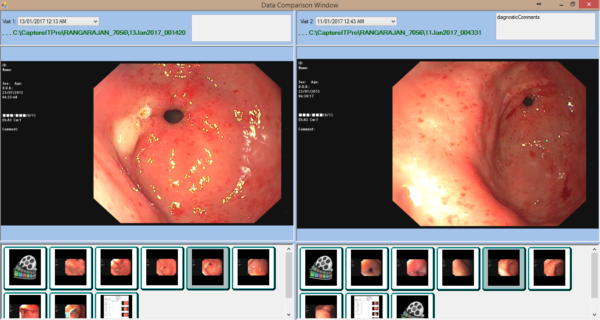
ColpoITPro software stores patient data in multiple visits based on date wise. Easy to retrieve the images, videos and reports quickly, the visit compare feature loads patient data from two different visits in side-by-side interface. User can review those images quickly and the videos can be playback simultaneously. It helps to the patient for understanding the treatment curve.
Additional Features
- Patient database with intelligent dynamic search options.
- Automatic data import from multiple sources.
- In-built emailing to securely send patient reports.
- Record Patient In/Out timer values to monitor workflow efficiency.
- Export patient data to CD/DVD or USB flash memory.
- Live procedure streaming over a secure network.
- Easy data archiving and retrieval for long-term management.
ColpoITPro V2.0 Editions
ColpoITPro Software is available in following editions to satisfy your Colposcopy imaging and documentation needs.
- Lite Edition
Contains all necessary features like image/video capturing, report generation and printing, CD/DVD/USB drive copy, Import, Export, Archive/Retrieve, EMR/HL7 Interface, Multi-language support and RTF Report Editing. - DICOM Edition
All Lite Edition Features plus DICOM image/report saving, DICOM send/receive to PACS and DICOM Modality Worklist Import (MWL). - HD Edition
All Lite Edition Features plus FULL HD (1080p or 720p) image/vidoe capture, H.264 compression and storage. - HD+DICOM Edition
Full edition with both HD and DICOM features.
Download Brochure
Download our “ColpoITPro V2.0” brochure for viewing and/or printing. Viewing and printing the brochure requires that you have the Adobe Acrobat Reader installed on your computer. If you do not have the Reader, you can download it for free from Adobe’s website.