CaptureITPro – The Complete Solution for Medical Imaging & Documentation
Version 2.0 | CE Certified | FDA Registered
CaptureITPro is a next-generation medical imaging and documentation platform engineered for precision, speed, and reliability. Designed for multi-specialty clinical environments, it seamlessly connects with leading Endoscopy, Laparoscopy, Bronchoscopy, Gastroscopy, Colonoscopy, Arthroscopy, Cystoscopy, Arthroscopy, Surgical Microscopes and other imaging systems. With powerful HD video capture, advanced DICOM capabilities, and customizable reporting, CaptureITPro is the only imaging software your practice will ever need.
Simple Elegant Design
Easy to Use
Simple Elegant Design
Easy to Use
All Inclusive Architecture
Feature Rich
All Inclusive Architecture
Feature Rich
Trusted By Thousands
Value for Money
Trusted By Thousands
Value for Money
CaptureITPro Medical Imaging Software : The Only Imaging Software You Need
CaptureITPro software connects to SD/HD Endoscope camera (Svideo/RCA/BNC/DVI/HDMI/SDI) output and allows recording video/images in HD resolution (720p/1080p). High quality images/videos are very useful for presentation, training, and reporting purposes. Video output is captured via a SD/HD video capture card installed in the system running CaptureITPro software and is stored/retrieved/managed by the software. Efficient compression techniques are used to reduce video storage space.
CaptureITPro software allows Capturing images from both DICOM & Non-DICOM modalities and store in BMP/JPG/DICOM format. Record medical procedure videos with best possible compression and playback recorded video for image capture or EBM practice. Generate customizable reports with images for various medical procedures and store reports in DICOM/PDF/RTF format.
CaptureITPro is a world-class HD ready product from AmbalSoft and it is the answer to your search for simple fast, reliable and efficient HD video capture and image management software.
CaptureITPro is a CE certified and FDA registered medical documentation platform designed to deliver fast, accurate, and high-quality clinical imaging. Built with a user-friendly and functionally rich architecture, it seamlessly connects with a wide range of visual-light medical devices, including Endoscopy, Laparoscopy, Bronchoscopy, Gastroscopy, Colonoscopy, Arthroscopy, Cystoscopy, Arthroscopy, Surgical Microscopes. The software enables unlimited high-definition video recording and image capturing for all types of medical procedures, ensuring that every clinical moment is documented with exceptional clarity. As a fully vendor-neutral system, CaptureITPro integrates smoothly with all major brands of video endoscopy equipment, making it an ideal choice for clinics, hospitals, and multi-specialty centers seeking reliable, scalable, and future-ready imaging software.
High Definition Capture
CaptureITPro delivers superior HD image and video recording through direct integration with SD and HD camera outputs, including S-Video, RCA, BNC, DVI, HDMI, and HD-SDI. It records in true 720p and 1080p resolution with smooth playback performance, supported by advanced H.264 compression technology. This ensures exceptional quality with optimal storage efficiency. Combined audio-video capture makes it ideal for case documentation, academic presentations, and surgical reviews.
Picture-in-Picture (PIP) Mode
CaptureITPro offers an advanced Picture-in-Picture (PIP) mode that allows two video sources to be displayed simultaneously on a single screen. This feature is particularly valuable during complex procedures such as EUS, EBUS, and ERCP, where clinicians need to monitor both endoscopic and fluoroscopic views at the same time. Users can instantly switch the primary and secondary video windows for optimal visibility, ensuring a comfortable and uninterrupted workflow. During live procedures, important areas can be highlighted directly on the video for clearer documentation. CaptureITPro also supports multiple video inputs, including Composite and S-Video, enabling real-time switching between sources while recording without any loss of quality.
DICOM Support
CaptureITPro provides comprehensive DICOM connectivity, enabling seamless integration with modalities such as Ultrasound, C-Arm, USG, and Fluoroscopy. The software can receive DICOM images directly and store them in DICOM, BMP, or JPEG formats for flexible use. Clinicians can effortlessly generate combined reports that include both endoscopic visuals and DICOM images, ensuring complete and accurate documentation of each procedure. All captured images, videos, and reports can be transmitted to the PACS server for centralized storage and long-term retrieval. CaptureITPro also supports receiving C-Arm and Fluoroscopy images and saving them in standard formats like JPEG or BMP, eliminating the need for costly DICOM printers while improving operational efficiency.
Customizable report templates
CaptureITPro software has predefined templates for various medical procedures, every report template has the finding libraries where the user chooses the findings instead of typing manually. Also users can customize their own templates in their regional languages. Microsoft word interface reporting facility will give more flexibility in the customization.
Profile based settings
CaptureITPro software readily integrates with Hospital Management System (HMS). Follows international standards like HL7 or DICOM MWL. It has wide range of versions support in HL7 protocol. It provides bi-directional communication to get patient data from HMS / RIS and send captured data back to the server for centralized storage. It can handle ORM / ADT messages for various activity like New order, Order Cancel, Order update etc.
HL7 Complaint
HL7 and HMS Integration CaptureITPro seamlessly integrates with Hospital Management Systems (HMS) and Radiology Information Systems (RIS), adhering to international standards such as HL7 and DICOM Modality Worklist (MWL). The software supports a wide range of HL7 protocol versions, providing reliable bi-directional communication to retrieve patient data from the HMS/RIS and transmit captured images, videos, and reports back to the centralized server. It efficiently handles ORM and ADT messages, including new orders, order cancellations, and order updates, ensuring smooth workflow, accurate patient records, and centralized clinical data management across departments.
Client-Server Architecture
Client–Server Architecture CaptureITPro is designed with a robust client–server architecture that allows multiple procedure client systems to connect seamlessly to a centralized database. The system is fully scalable, enabling the addition of new client workstations as your facility grows. Each client can operate in standalone mode or synchronize with the central server for unified data management. Dedicated viewer licenses can be configured for registration or reporting stations, allowing users to perform patient registration or generate reports independently from the image and video capturing clients. This flexible setup ensures efficient workflow distribution while maintaining centralized control over all clinical data.
Image / Video Editing
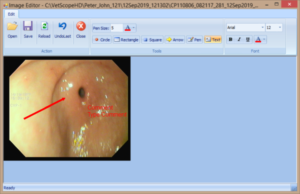
Image and Video Editing CaptureITPro includes a built-in image editor equipped with advanced annotation tools, allowing clinicians to highlight and mark important findings directly on captured images. The integrated video editor enables precise trimming and cropping of recorded video segments, making it easy to extract key portions for presentations, training, or documentation purposes. These tools ensure that all visual data is clearly communicated and professionally prepared for clinical, academic, or reporting use.
Intelligent Image Cropping
Intelligent Image Cropping
CaptureITPro features an intelligent image cropping tool that allows users to remove unwanted portions from captured images. This functionality is particularly useful for eliminating black borders or extraneous areas in endoscopy images, resulting in cleaner and more professional-looking reports. Users can choose between rectangular or circular cropping modes to precisely mask areas of the image, reducing printer ink usage while enhancing the visual presentation of printed reports.
Statistical Data Analysis
Statistical Data Analysis CaptureITPro securely stores all user inputs, including report findings, in its database, enabling comprehensive statistical analysis. The software allows generation of detailed reports based on various criteria, such as the number of procedures performed within a specific period, doctor-wise procedure counts, or patient registration trends for specific conditions like “Gastritis”. Users can also create visually intuitive charts and graphs from the database, providing actionable insights for clinical management, operational planning, and research purposes.
Visit Compare
Visit Comparison
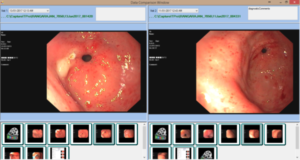
CaptureITPro maintains patient data across multiple visits, organized by date for easy access. Its visit comparison feature allows clinicians to load and view data from two separate visits side-by-side, including images, videos, and reports. Videos can be played simultaneously for detailed review, enabling quick assessment of treatment progress. This functionality not only supports accurate clinical evaluation but also helps patients better understand their treatment trajectory over time.
Scope button trigger or Foot pedal support
Scope Button and Foot Pedal Support
CaptureITPro includes a USB link box device that enables clinicians to capture images directly using the scope button or camera head trigger. In addition, the software supports USB foot pedals for hands-free operation, allowing users to start, pause, resume, and stop video recordings or capture images without interrupting the procedure. This feature ensures seamless documentation during surgeries and endoscopic procedures, enhancing workflow efficiency and maintaining focus on patient care.
Additional Features
Intelligent patient database with dynamic search options for quick record retrieval.
Automatic import of data from multiple sources to streamline workflow.
Built-in emailing functionality to securely send patient reports.
Patient In/Out timer to monitor and improve clinical workflow efficiency.
Export patient data to CD, DVD, or USB flash drives for secure storage.
Secure live streaming of procedures for real-time collaboration.
Easy archiving and retrieval of historical patient data.
CaptureITPro V2.0 Editions
CaptureITPro Software is available in following editions to satisfy your medical imaging and documentation needs.
Classic Edition Contains all necessary features like image/video capturing, report generation and printing, CD/DVD/USB drive copy, Import, Export and Archive/Retrieve.
Lite Edition All Classic Edition Features plus EMR/HL7 Interface, Multi-language support and RTF Report Editing.
DICOM Edition All Lite Edition Features plus DICOM image/report saving, DICOM send/receive to PACS and DICOM Modality Worklist Import (MWL).
HD Edition All Lite Edition Features plus FULL HD (1080p or 720p) image/vidoe capture, H.264 compression and storage.
HD+DICOM Edition Full edition with both HD and DICOM features.
CaptureITPro Software can run in Stand-alone mode or in Network (client-server) mode based on your requirements.
Download Brochure
Download our “CaptureITPro V2.0” brochure for viewing and/or printing. Viewing and printing the brochure requires that you have the Adobe Acrobat Reader installed on your computer. If you do not have the Reader, you can download it for free from Adobe’s website.